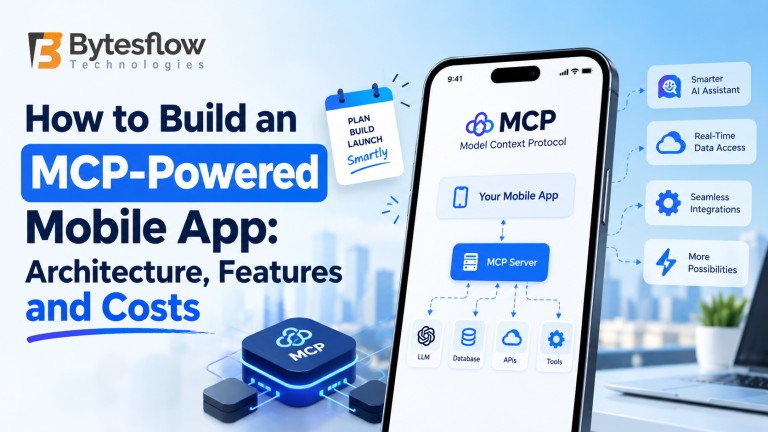
How to Build an MCP-Powered Mobile App: Architecture, Features and Costs
Published: October, 2026 | Category: On-Demand App Development | Read time: ~10 min
A customer opens your app and types, “Reorder last Friday’s dinner, but swap the paneer for chicken and deliver after 8.” A year ago, handling that sentence meant a fragile chain of custom intent parsers and hard-coded API calls. Today it is a routine job for an MCP-powered mobile app — an app where an AI agent can read your catalog, check order history, and place the order through standard, permissioned tools.
The Model Context Protocol (MCP) is the reason this became practical. It gives AI models one consistent way to discover and call your business functions, so you stop writing a bespoke integration for every model and every feature.
At Bytesflow, we have spent more than 17 years building delivery platforms, super apps and mobile products for clients across MENA, Southeast Asia and beyond. This guide distils how we think about MCP on mobile: the architecture that actually holds up in production, the features worth shipping first, and what it realistically costs.
What Is MCP, and Why Does It Matter for Mobile Apps?
MCP is an open standard that defines how an AI application (the host) talks to external capabilities (exposed by servers) through a client connection. A server publishes three kinds of things:
- Tools — actions the model can call, such as search_menu, create_order or track_driver
- Resources — readable context, such as a user’s saved addresses or a store’s opening hours
- Prompts — reusable instruction templates for common tasks
Because every server speaks the same protocol, the model doesn’t care whether a tool sits on your Laravel backend, a payment provider or a maps API.
The protocol has moved fast. It was introduced in November 2024, and by December 2025 the MCP maintainers reported more than 97 million monthly SDK downloads, around 10,000 active servers and client support in ChatGPT, Claude, Cursor, Gemini, Microsoft Copilot and VS Code. That same month, Anthropic donated MCP to the Agentic AI Foundation, a Linux Foundation fund co-founded with Block and OpenAI and backed by Google, Microsoft, AWS, Cloudflare and Bloomberg. For anyone budgeting a multi-year product, that neutral governance matters: you are not betting your architecture on one vendor’s roadmap.
The specification is also maturing toward production use. The July 2026 spec release made servers stateless and sessionless by default, which means an MCP server now scales horizontally like any other HTTP service. The updated MCP roadmap published in August 2026 prioritises server-initiated events, long-running tasks and stronger agent identity — all directly useful for mobile.
MCP vs. plain function calling
You can build an AI feature with a model’s native function calling and no MCP at all. The trouble starts at feature number five. Each new model, tool or partner integration means new glue code. MCP turns those integrations into reusable servers that any compliant model or agent can use. If you plan to swap LLM providers, offer an agent to partners, or let your app’s capabilities show up inside assistants like ChatGPT or Claude, MCP pays for itself quickly.
Reference Architecture for an MCP-Powered Mobile App
The most common mistake we see is trying to run the whole agent on the phone. API keys leak, battery drains and small on-device models struggle with multi-step tool use. The pattern that works keeps the phone thin and puts the intelligence in your backend.
[ Mobile App (Flutter / native) ]
│ HTTPS + streaming (SSE / WebSocket)
[ API Gateway / BFF ] ── auth, rate limits, user context
│
[ Agent Orchestrator = MCP Host ] ── LLM calls, planning, policy, memory
│ MCP clients (Streamable HTTP)
┌────────┼──────────────┬──────────────┐
[Catalog] [Orders] [Payments] [3rd-party: maps, CRM]
MCP server MCP server MCP server MCP servers
│
[ Data layer: database, vector store, audit logs, evals ]
Layer 1: The mobile client
The app handles conversation UI, voice capture, push notifications and — critically — confirmation screens. When the agent wants to place an order or charge a card, the app shows a native sheet with the exact items and total, and the user taps to approve. The client renders structured results (product cards, maps, order timelines), not just chat bubbles. Flutter works well here because one codebase covers both stores and handles streaming text smoothly.
Layer 2: API gateway or backend-for-frontend
This layer authenticates the user, attaches their identity to every agent request, enforces rate limits and streams responses back. It also keeps provider API keys off the device entirely.
Layer 3: The agent orchestrator (MCP host)
This is the brain. It sends the conversation to the LLM, receives tool-call requests, routes them to the right MCP server, and applies policy: which tools this user may call, which actions need human approval, and how much the agent may spend per session. It also manages short-term conversation memory and long-term preferences.
Layer 4: MCP servers
Each server wraps one domain of your existing system. For an on-demand platform, that might be catalog, orders, payments, delivery tracking and support. Good servers expose a small number of well-described tools with tight input schemas — create_order(store_id, items[], address_id, slot) beats a generic call_api(endpoint, body) every time. Third-party MCP servers for maps, calendars or CRMs plug in alongside yours.
Layer 5: Data, retrieval and observability
A vector store supports retrieval for menus, FAQs and policies. Audit logs record every tool call with the user, inputs and outcome. Evaluation suites replay real conversations to catch regressions when you change models or prompts.
Can MCP run on the device itself?
It can, for narrow cases: an offline assistant over local notes, or a privacy-sensitive feature using an on-device model. For commerce, delivery and anything involving payments, keep the MCP host server-side. Local servers typically use stdio transport, while remote servers use Streamable HTTP — and remote is what a mobile product needs.
Must-Have Features in an MCP-Powered Mobile App
Not every feature needs an agent. These are the ones where MCP earns its place.
Conversational search and ordering
Users describe what they want in plain language — “something vegetarian under 300 rupees that arrives in 30 minutes” — and the agent calls search, filter and availability tools. This is the highest-impact starting point for food delivery and grocery apps.
Actions with human approval
Reordering, rescheduling a pickup, cancelling a booking or applying a promo code. The agent prepares the action; the user confirms it in a native UI. MCP’s elicitation feature, which lets a server ask the user for missing input mid-task, fits this pattern neatly.
Context-aware personalisation
Resources expose saved addresses, dietary preferences and order history, so the agent answers “the usual” correctly without the user re-typing anything.
Voice-first interaction
Speech-to-text in, streamed text-to-speech out. In markets like the Gulf and Southeast Asia, voice in Arabic, Bahasa or Tamil often outperforms typed chat, especially for drivers and older users.
Proactive updates
“Your rider is two minutes away — want me to add a drink?” Server-initiated events are a stated priority on the MCP roadmap; until they land in the core spec, combine your existing push infrastructure with agent-generated messages.
Multi-service orchestration
In a multi-service super app, one request can span services: “Book a cab to the airport and send my laundry pickup to the office instead.” Separate MCP servers per vertical let one agent coordinate them cleanly.
Operator and merchant copilots
The same MCP servers can power assistants inside your admin and store panels — “Which items went out of stock most this week?” — so the integration work serves customers, merchants and ops teams at once.
Security: Where MCP Projects Succeed or Fail
Giving a model the ability to act on a user’s account is powerful and risky. Industry analysts and the MCP maintainers themselves have flagged identity and fine-grained permissions as the protocol’s biggest enterprise gap, and the current roadmap targets stronger token handling and workload identity. Until those mature, design defensively:
- Per-user OAuth tokens. Use the MCP authorization approach based on OAuth 2.1 so every tool call runs with the signed-in user’s scopes, never a shared service account.
- Tool allowlists by role. A customer’s agent should never see refund or payout tools that belong to admins.
- Human-in-the-loop for money. Payments, refunds and account changes always require explicit confirmation in the app UI.
- Prompt injection defences. Treat text from reviews, chat messages and third-party content as untrusted. The OWASP Top 10 for LLM Applications is a sensible baseline checklist.
- Spend and rate limits. Cap tool calls and tokens per session so a looping agent can’t run up costs.
- Full audit trails. Log every tool call with user, inputs, output and approval status — essential for disputes and regulators.
How to Build an MCP-Powered Mobile App: Step by Step
- Pick two or three high-value use cases. Start where conversation clearly beats tapping — reordering, support, complex search. Define success metrics before writing code.
- Map tools to your existing APIs. List the backend functions each use case needs. Most of the work is designing clean, narrow tool schemas, not building new business logic.
- Build and harden MCP servers. Wrap your existing services using the official MCP SDKs, add validation, auth and logging, and test each tool in isolation.
- Stand up the orchestrator. Choose your LLM, write system instructions, configure tool routing and approval policies, and connect conversation memory.
- Design the mobile experience. Streaming responses, rich result cards, confirmation sheets, voice input and graceful fallbacks when the agent isn’t sure.
- Evaluate before launch. Build a test set of real user requests and score accuracy, tool selection and safety. Red-team for prompt injection.
- Launch gradually and monitor. Roll out to a percentage of users, watch completion rates, cost per conversation and escalation rates, and iterate weekly.
How Much Does an MCP-Powered Mobile App Cost?
Cost depends far more on how many systems the agent touches and how much it is allowed to do than on screen count. The ranges below are indicative planning figures for a professional team; your final quote depends on scope, integrations and compliance needs.
Scope | What’s included | Indicative cost (USD) | Timeline |
|---|---|---|---|
AI assistant added to an existing app | 1–2 MCP servers, 5–10 tools, chat UI, read-mostly actions | $15,000 – $35,000 | 6–10 weeks |
New app with an agentic core | Customer app + backend, 3–5 MCP servers, voice, approval flows, admin copilot | $40,000 – $90,000 | 3–5 months |
Multi-service agentic super app | Multiple verticals, customer/driver/merchant apps, many servers, multilingual voice, compliance and audit tooling | $100,000 – $250,000+ | 6–9 months |
What drives the cost
- Number and quality of existing APIs. Clean, documented APIs make MCP servers quick to build. Legacy systems need an adapter layer first.
- Action risk level. Read-only assistants are cheaper than agents that move money or change bookings, which need approval flows and audit tooling.
- Languages and voice. Each additional language needs testing and evaluation data.
- Compliance. Health, pharmacy and alcohol delivery bring extra consent, verification and logging requirements.
Ongoing running costs
Budget for LLM usage (usually billed per token and driven by conversation length and the number of tool calls), hosting for MCP servers and the orchestrator, vector database storage, monitoring, and periodic evaluation runs. Caching common answers, using smaller models for simple routing, and keeping tool responses compact are the three most effective ways to keep per-conversation costs predictable.
Build from scratch or start from a proven platform?
If your core product is an on-demand marketplace, starting from a production-ready platform such as our all-in-one delivery script and layering MCP on top usually cuts months off delivery, because the order, catalog and logistics APIs already exist. We compare the trade-offs in detail in our guide to white-label vs. custom delivery apps.
Where to Go From Here
MCP has crossed the line from experiment to infrastructure: open governance, a stateless spec that scales like any web service, and support across every major AI platform. What separates a gimmick from a genuinely useful MCP-powered mobile app is the unglamorous work — narrow, well-described tools, strict permissions, approval flows for anything that costs money, and constant evaluation. Start with two use cases your customers already ask for, prove them, then widen the agent’s reach.
Ready to add an AI agent to your app? Bytesflow builds MCP-powered AI agents and Flutter apps end to end.
Frequently Asked Questions
1. What is an MCP-powered mobile app?
It is a mobile app where an AI agent uses the Model Context Protocol to access your business data and actions — search, orders, bookings, tracking — through standardised, permissioned tools instead of custom one-off integrations.
2. Can an MCP server run directly on a phone?
Technically yes, for offline or privacy-focused features using local transport. For commerce and payments, keep the MCP host and servers on your backend so keys, policies and audit logs stay under your control.
3. How much does it cost to build an AI agent mobile app?
Adding an assistant to an existing app typically starts around $15,000–$35,000. A new app with an agentic core falls in the $40,000–$90,000 range, and multi-service super apps can exceed $100,000, plus ongoing LLM and hosting costs.
4. Is MCP better than plain function calling?
For a single small feature, native function calling is fine. Once you have several tools, multiple models or partner integrations, MCP’s reusable servers reduce duplicated glue code and make switching LLM providers far easier.
5. Is the Model Context Protocol secure enough for payments?
It can be, if you design for it: per-user OAuth scopes, role-based tool allowlists, explicit in-app confirmation for every payment, prompt-injection defences and full audit logs. The protocol supports these patterns, but your implementation has to enforce them.
6. How long does it take to build an MCP-powered app?
An assistant layered on an existing app can ship in 6–10 weeks. A new agent-first app usually takes 3–5 months, and a multi-service super app 6–9 months.
7. Can I add MCP to my existing mobile app?
Yes, and it is often the smartest first step. If your app already has a backend API, you wrap the relevant endpoints as MCP servers, add an orchestrator, and introduce a conversational entry point without rebuilding the app.