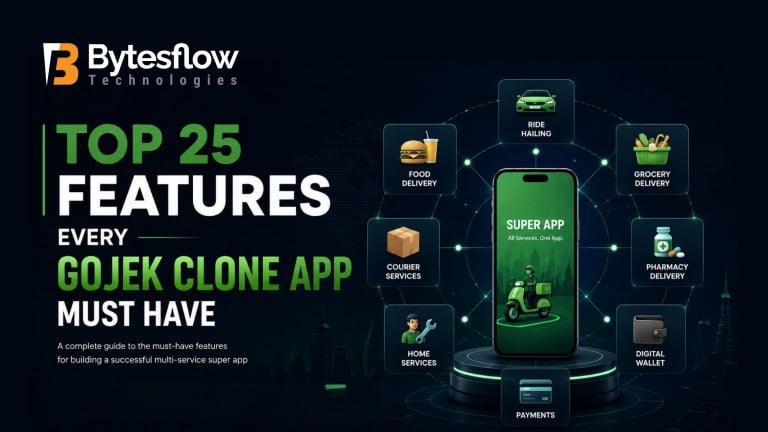
Top 25 Features Every Gojek Clone App Must Have
Published: June 05, 2026 | Category: Super App Development | Read time: ~15 min
Introduction
The super app economy is no longer a Southeast Asian phenomenon. From Lagos to Riyadh to São Paulo, entrepreneurs are racing to build the next Gojek, a single platform where users can order food, book a ride, pay bills, and access a dozen other services without ever switching apps.
But here is the uncomfortable truth most developers won’t tell you: not all Gojek clone apps are built equal. Many startups invest heavily in development only to launch a product that looks like a super app but functions like a fragmented mess of features bolted together.
The difference between a super app that scales and one that stalls comes down to one thing the right features, built the right way, from day one.
In this guide, we break down the top 25 features every Gojek clone app must have before it launches. Whether you’re exploring a Gojek clone app or building from scratch, this is the feature checklist you cannot afford to skip.
Why Features Define the Success of Your Super App
Gojek didn’t become a $10B+ company by having the most services. It became dominant because its platform made each service feel native, fast, and trustworthy. The architecture underneath the features powering the user experience is what enabled that.
When you build a Gojek clone, your feature set does three things:
- Determines user retention – missing a core feature sends users to a competitor immediately
- Defines operational efficiency – the right admin and driver tools cut overhead dramatically
- Signals investor confidence – a feature-complete MVP raises far more credibly than a patchy one
Let’s break down every feature you need, organised by who it serves.
USER APP FEATURES
Feature 1: Multi-Service Dashboard
The heart of any super app is a clean, unified home screen that surfaces all services – ridehailing, food delivery, grocery, courier, home services without overwhelming the user.
Why it matters: Users should be able to switch between booking a ride and ordering lunch in under two taps. A cluttered or slow dashboard kills engagement before it begins.
What to look for: Personalized service tiles, recently used shortcuts, contextual banners (e.g., showing food delivery at lunchtime), and fast load times under 1.5 seconds.
💡 Pro tip: The most successful super apps surface only the top 4–5 services prominently on the home screen. The rest live in a “More” menu reducing cognitive load without hiding functionality.
Feature 2: Smart Registration & Social Login
Users should be able to onboard in under 60 seconds. Lengthy registration forms are conversion killers.
Must include:
- Phone number + OTP login (most reliable in emerging markets)
- Google, Apple, and Facebook single sign-on
- Email registration as a fallback
- Automatic profile completion from social data
A Gojek clone script that supports multi-channel registration dramatically increases Day 1 activation rates.
Feature 3: Real-Time GPS Tracking
This is non-negotiable for every service involving physical movement rides, deliveries, couriers.
What “real-time” actually means in 2026:
- Sub-3-second GPS update intervals
- Map rendering that doesn’t stutter on mid-range Android devices
- Accurate ETA calculations that account for traffic
- Live driver/delivery agent route visualization on the user’s screen
Cutting corners here destroys trust faster than any bug. If the map shows the driver on the wrong street, users cancel and uninstall.
Feature 4: Advanced In-App Search & Filters
For a marketplace with hundreds of restaurants or service providers, search quality is everything.
Must-have search capabilities:
- Keyword search across all service categories
- Filter by rating, price, distance, availability, and cuisine/service type
- Search history and smart autocomplete
- Voice search (increasingly expected in 2026)
Feature 5: Multiple Payment Methods
In any emerging market, payment preference diversity is enormous. Your super app must support all of them natively.
Payment stack your clone needs:
- In-app wallet (critical this is your monetisation flywheel)
- Credit/debit cards with secure tokenisation
- UPI / local payment rails (vary by country)
- Cash on delivery for service and food orders
- QR code payments
- Buy Now Pay Later integrations
Feature 6: In-App Wallet & Loyalty Coins
Your wallet is not just a payment method, it is your user retention engine.
When users have a balance in your app wallet, they are psychologically anchored to your platform. Add a coin/loyalty point system where every transaction earns redeemable points, and you have a retention loop that compounds over time.
Wallet features to include:
- Top-up via bank transfer, card, or cash agents
- Wallet-to-wallet transfers between users
- Cashback on qualifying transactions
- Loyalty coins with tiered redemption
Feature 7: Ratings & Reviews System
Every service provider driver, restaurant, grocery store, handyman needs a transparent rating system.
Why bidirectional ratings matter: Not only should users rate service providers, but service providers should rate users too. This creates a quality loop that improves platform behavior on both sides.
Features to build:
- 5-star ratings with written reviews
- Photo review uploads
- Response capability for service providers
- Automated flagging of fake reviews
Feature 8: Push Notifications & In-App Alerts
Timely, relevant notifications are the difference between a user who stays engaged and one who forgets your app exists.
Notification types your clone must support:
- Order status updates (confirmed, on the way, arriving, delivered)
- Promotional offers and flash deals
- Referral reward alerts
- Price surge/availability warnings
- Re-engagement nudges for dormant users
Critical: Build notification preferences users must be able to control what they receive or they will disable all notifications.
Feature 9: Promo Codes & Discount Engine
Every growth phase of a super app involves aggressive promotions. Your platform must support a flexible, rule-based discount engine out of the box.
Discount engine capabilities:
- Percentage and flat-rate discount codes
- First-time user offers per service
- Time-limited flash deals
- Referral discount chains
- Minimum order thresholds for discount activation
- Single-use vs. multi-use code control
Feature 10: Multi-Language & Multi-Currency Support
If you are building for any market outside your home country or targeting a multilingual user base this is a day-one requirement, not a future phase.
What this involves:
- RTL (right-to-left) language support (Arabic, Hebrew, Urdu)
- Dynamic currency formatting per user location
- Localized date, time, and distance formats
- Seamless language toggle without app restart
Feature 11: In-App Chat & SOS Emergency Button
Users need to contact their driver or delivery agent without leaving the app. And in markets where safety is a concern, an SOS button is a trust differentiator that can drive significant press coverage and user adoption.
Communication features:
- Masked phone calls (protect both user and provider privacy)
- In-app text chat with media sharing
- Pre-set quick messages (e.g., “I’m outside,” “Running 2 mins late”)
Safety features:
- One-tap SOS that alerts emergency contacts with live location
- Trip sharing with real-time tracking link
- Safe arrival confirmation prompt
Feature 12: Scheduled Bookings
Not every user needs something right now. Allowing advance scheduling significantly expands your addressable use cases airport transfers, weekly grocery delivery, recurring home cleaning.
Scheduling features to build:
- Date and time picker with provider availability calendar
- Automated reminders for both user and provider
- Easy reschedule and cancel flows
- No-show penalties to protect provider revenue
This is a feature area where on-demand app development agencies often cut corners make sure your clone includes it fully.
SERVICE PROVIDER APP FEATURES
Feature 13: Provider Onboarding & Verification Flow
How quickly and reliably you onboard service providers determines how fast your supply side scales.
Onboarding must include:
- Document upload (license, ID, vehicle registration)
- Background check integration with local verification APIs
- Training video module with in-app quiz
- Tiered approval pending, approved, suspended
- Provider agreement e-sign within the app
Feature 14: Earnings Dashboard & Payout Management
Service providers are entrepreneurs. Give them financial clarity and they will be your most loyal asset.
What the earnings dashboard must show:
- Daily, weekly, and monthly earnings breakdown
- Per-trip/per-order earning detail with commission deduction transparency
- Bonus and incentive tracker
- Payout history with downloadable receipts
- Bank account / wallet withdrawal with clear settlement timelines
Feature 15: Availability Toggle & Heat Map
Providers need to control when they work. A simple online/offline toggle is expected but to truly empower providers, show them a demand heatmap so they know where to position themselves for maximum earnings.
Provider tools:
- Online/offline toggle with custom break modes
- Surge zone visualization on the map
- Predicted demand by area and time
- Weekly earnings forecast based on availability patterns
Feature 16: In-App Navigation Integration
The driver/agent app must integrate with best-in-class navigation not just show a map.
Navigation requirements:
- Google Maps / Waze / HERE Maps integration (provider’s choice)
- Turn-by-turn voice navigation in the provider’s language
- Multi-stop route optimization for delivery batching
- Offline map availability for low-connectivity areas
ADMIN PANEL FEATURES
Feature 17: Centralized Super Admin Dashboard
Your admin panel is the control room for your entire business. A weak admin panel means slow decisions, manual interventions, and missed revenue.
What the super admin dashboard must display:
- Real-time active orders and live map overview
- Revenue metrics: GMV, take rate, net revenue by service
- User acquisition and retention KPIs
- Service provider supply and demand balance
- Alerts for system anomalies
Feature 18: Service Management Module
Since your platform hosts multiple services, admins must be able to configure, pause, and modify each service independently without requiring a developer.
Service management capabilities:
- Add/remove service categories
- Set service-specific pricing, commission rates, and surge rules
- Toggle services by geography (e.g., ride-hailing only in metro areas)
- A/B test new service launches before full rollout
Feature 19: Dynamic Pricing & Surge Control
Surge pricing is how super apps balance supply and demand during peak hours. Done right, it increases provider earnings and maintains service availability. Done wrong, it destroys user trust.
Pricing engine must support:
- Rule-based surge triggers (time, demand-to-supply ratio, weather)
- Geographic surge zone definition on a map editor
- Maximum surge cap to prevent PR disasters
- Transparent surge communication to users pre-booking
Feature 20: Commission & Revenue Configuration
Every service on your platform can have a different business model. Your admin panel must support granular commission control without code changes.
Revenue configuration options:
- Percentage commission per service category
- Flat-fee models for subscription-tier providers
- Promotional zero-commission windows to attract new providers
- Split payments for marketplace models (user pays restaurant + platform fee separately)
Feature 21: Dispute & Refund Management
At scale, 1–3% of all orders will generate a dispute. Your admin team needs tools to resolve these efficiently not through email threads.
Dispute management system:
- Structured dispute submission from both user and provider side
- Evidence upload (photos, chat history)
- Admin review queue with SLA tracking
- One-click refund to wallet or original payment method
- Escalation tier for high-value or repeat disputes
Feature 22: Advanced Analytics & Reporting
Data is your competitive moat. The admin panel must surface actionable analytics not just vanity metrics.
Analytics modules to include:
- Cohort retention analysis by acquisition channel
- Service-level profitability breakdown
- Provider performance scoring
- Churn prediction alerts for high-risk users
- Geographic penetration heatmaps
Export everything to CSV and integrate with BI tools like Google Looker or Tableau.
GROWTH & PLATFORM FEATURES
Feature 23: Referral Program Engine
Referral programs consistently deliver the lowest customer acquisition cost across all super app markets. Your platform needs a native, flexible referral engine not a bolted-on third-party tool.
Referral engine requirements:
- Unique referral codes per user
- Dual-sided incentives (referrer and referee both rewarded)
- Service-specific referral campaigns (e.g., “refer a friend, both get free delivery for a week”)
- Fraud detection to prevent self-referral abuse
- Admin dashboard to manage referral campaign budgets
Feature 24: API Integration Layer & Third-Party Extensibility
A super app is only as powerful as its ecosystem. Your white-label solution must include a clean API layer that allows you to integrate with:
- Local logistics providers (last-mile delivery partners)
- Food aggregators (to seed initial restaurant supply)
- Payment gateways (country-specific rails)
- Government services (bill payment APIs, transport authorities)
- CRM and marketing tools (Braze, CleverTap, MoEngage)
Feature 25: White-Label Customization & Branding Control
If you are buying or licensing a Gojek clone script, insist on full white-label control. This means:
- Complete brand theming (colors, fonts, logo, icon sets) via admin panel no code changes required
- Configurable app name and store listing assets
- Custom splash screens and onboarding flows
- Country-specific legal pages (terms, privacy policy) with in-app management
- White-labeled email and SMS notifications
Without this, every brand update costs you developer hours. At scale, that becomes a significant operational burden.
The Feature Priority Matrix: What to Build First
Not all 25 features need to be live on Day 1. Here is how to phase your build intelligently:
Phase | Features | Goal |
|---|---|---|
MVP (Launch) | 1, 2, 3, 5, 6, 7, 8, 13, 14, 17 | Validate core loop |
Growth (Month 2–4) | 4, 9, 10, 11, 15, 18, 19, 23 | Drive retention & supply |
Scale (Month 5+) | 12, 16, 20, 21, 22, 24, 25 | Optimize & expand |
How BytesFlow’s Gojek Clone Delivers All 25 Features
Building these 25 features from scratch takes 12–18 months and $150,000+. BytesFlow’s Gojek clone app is pre-built with every feature on this list tested, optimised, and ready to white-label for your brand.
What you get with BytesFlow:
- ✅ All 25 features pre-built and tested
- ✅ iOS + Android apps + Web panel + Super Admin dashboard
- ✅ 6 months of post-launch technical support
- ✅ Deployment in as little as 2 weeks
Email us at: [email protected]
👉 View Live Demo | Get a Free Consultation
Frequently Asked Questions
1. What is a Gojek clone app?
A Gojek clone app is a multi-service super app platform inspired by Gojek’s model, offering services like ride-hailing, food delivery, payments, and more from a single app.
2. How much does it cost to build a Gojek clone app?
The cost to build a Gojek clone app typically ranges from $15,000 to $80,000+ depending on features, platforms, and customizations. A white-label solution significantly reduces cost and time-to-market.
3. What are the must-have features in a Gojek clone?
Must-have features include a multi-service dashboard, real-time GPS tracking, in-app wallet, multi-language support, advanced admin panel, push notifications, and a robust ratings system.
4. How long does it take to build a Gojek clone app?
With a ready-made Gojek clone script, you can launch in as little as 2–4 weeks. Custom development from scratch typically takes 4–8 months.
5. Can a Gojek clone app be customized for any country?
Yes. A well-built Gojek clone supports multi-currency, multi-language, and region-specific service configurations to adapt to any local market.