Restaurant Menu Digitization Using AI: A Step-by-Step Guide
Published: August 3, 2026 | Category: AI and Automation | Read time: ~10 min
Introduction
Typing out a 60-item menu by hand into a POS system takes hours, and one missed price or wrong category can quietly cost you real revenue. Restaurant menu digitization using AI solves this problem by reading your existing menu: a photo, a PDF, or a spreadsheet and automatically turning it into a structured, ready-to-publish digital menu in minutes instead of days. Below is a complete, step-by-step breakdown of how the process works, why it matters, and how to get started today.
What Is Restaurant Menu Digitization Using AI?
Restaurant menu digitization using AI refers to the process of converting a physical or unstructured menu into a clean, organized digital format using artificial intelligence, rather than relying on manual data entry. Instead of a staff member retyping every dish, price, and section by hand, the AI scans the uploaded file and extracts the details on its own. Specifically, the system typically pulls out:
- Item names and short descriptions
- Prices and portion sizes
- Categories and sections, such as starters, mains, or beverages
- Veg or non-veg tags
- A confidence score showing how accurately each item was read
Consequently, what once required a full afternoon of copy-pasting now takes just a few clicks, freeing up staff time for guests instead of spreadsheets.
Why Restaurants Are Moving Away From Manual Menu Entry
Manual entry is not just slow; it is also one of the leading causes of order and pricing errors in restaurants. Meanwhile, industry data shows that over a quarter of restaurant operators already use some form of AI in daily operations, and that share continues to climb every quarter. Furthermore, analysts note that AI only delivers real returns when it sits on top of clean, structured menu data rather than a scattered mix of spreadsheets and printed cards. In fact, easy digital menu access is already one of the biggest attractions for customers ordering online, which makes getting the menu right early on well worth the effort.
Here is a quick comparison of what typically changes when a restaurant switches from manual entry to automated digitization:
Task | Manual Menu Entry | AI Menu Import |
Time to add 50 items | 3 to 5 hours | Under 6 minutes |
Typing or pricing errors | Common, especially at scale | Rare, and flagged with a confidence score |
Categorization | Done by hand, section by section | Auto-detected from the source file |
Veg or non-veg tagging | Manual review required | Auto-tagged, editable before publishing |
Multi-channel menu sync | Repeated separately on each platform | Updated once, published everywhere |
How Restaurant Menu Digitization Using AI Works: A Step-by-Step Guide
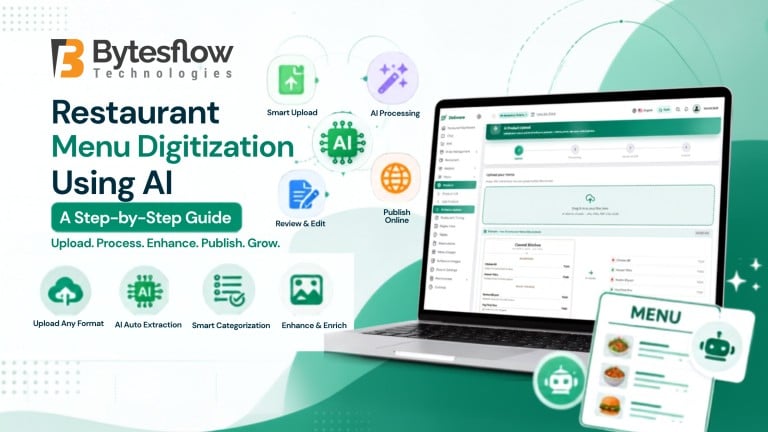
So, how does the actual process look in practice? Based on a real product walkthrough, restaurant menu digitization using AI generally follows four clear steps, from upload to a fully published menu.
Step 1: Upload Your Menu
First, upload your existing menu file. Most tools accept:
- A photo of a printed menu, in JPG or PNG format
- A PDF menu
- An Excel or CSV file listing item names, prices, and categories
Notably, you can usually upload multiple files at once, which helps if your menu is split across several pages or sections.
Step 2: Let AI Read and Process the Menu
Next, the automated engine behind the AI restaurant menu upload takes over. It reads the file, detects sections and categories, identifies each item’s name and price, and estimates whether the dish is veg or non-veg. This step usually finishes in under a minute, even for larger menus with 40 or more items across multiple sections.
Step 3: Review and Edit Extracted Items
Once processing finishes, you land on a review screen showing every detected item alongside its price, category, veg status, and a confidence percentage. At this stage, you can:
- Edit any name, price, or category before publishing
- Add specifications, portion sizes, or item images in bulk
- Delete or merge any duplicate entries
This is also where the process moves from simply “helpful” to genuinely impressive. With a single click, the same AI that read your menu can enrich every item on it:
- Write a description for every dish, automatically, from its name alone. A plain “Danish Pastry” becomes something like “Buttery, flaky, and warmly spiced, with a sweet filling that melts into every bite,” generated without the AI ever having tasted it.
- Generate specifications, such as calorie count and fat content, for each item.
- Create size variants such as Small, Regular, and Large, complete with adjusted pricing and a short description for each size.
- Generate a product image with AI, or upload your own if you already have professional photography.
Because nothing publishes automatically until you approve it, you stay in full control of accuracy and brand voice, while still saving hours of manual work that would otherwise go into writing copy, sizing options, and sourcing images one item at a time.
Step 4: Publish to Your Live Menu
Finally, once everything looks correct, you publish the batch. Within seconds, all reviewed items go live on your digital menu, POS, and connected ordering channels, ready for streamlined food delivery menu management across every platform you use, from your own website to third-party delivery apps.
Two Ways to Digitize Your Menu
Depending on the format your existing menu is already in, there are two practical paths for a smooth AI restaurant menu upload:
- Image or PDF to AI menu: Best for restaurants that only have a printed or scanned menu. Simply photograph or scan it, and the AI extracts the structure automatically.
- Excel or CSV to AI menu: Best for restaurants that already track their menu in a spreadsheet. This method tends to produce slightly higher confidence scores, since the source data is already structured.
Either way, the outcome is the same: complete restaurant menu digitization using AI, without retyping a single line by hand.
Benefits of Using AI for Menu Data Entry
So what do restaurants actually gain by switching to this approach? The core benefits include:
- Speed: A menu that once took hours to enter can be processed in minutes.
- Accuracy: Confidence scoring flags low-certainty items for a quick manual check instead of a full re-entry.
- Consistency: Categories, pricing, and veg or non-veg tags follow a uniform structure across the entire menu.
- Scalability: Multi-location restaurants can digitize dozens of menus without hiring extra data-entry staff.
- Better food delivery menu management: Once digitized, updates sync across your website, app, and delivery partners from a single source, instead of updating each platform separately.
As a result, teams spend less time on repetitive admin work and more time on service and food quality. Altogether, these gains explain why restaurant menu digitization using AI adoption keeps accelerating across the industry.
Conclusion
Restaurant menu digitization using AI removes the single biggest bottleneck in setting up or updating a digital menu: manual data entry. Instead of spending hours retyping items, prices, and categories, you upload a file, let AI do the reading, review the results in minutes, and publish across every channel at once. If you are still managing your menu by hand, now is the right time to change that.
Ready to see it in action?
Try our AI menu import for your restaurant and turn your existing menu into a fully digital, ready-to-publish menu in minutes.
Frequently Asked Questions
1. What is restaurant menu digitization using AI?
It is the process of using AI to automatically read a menu file and convert it into a structured digital menu, without manual data entry.
2. What are the benefits of using AI for menu data entry?
Faster setup, fewer pricing and category errors, and consistent formatting across every ordering channel.
3. Can I use AI to automatically update my restaurant menu online?
Yes. Re-upload a file or edit items directly, and the changes publish across your website, POS, and delivery channels instantly.
4. Where can I find AI menu upload services for small businesses?
Choose an all-in-one restaurant platform like Deliware, which includes AI Menu Upload built into its POS and ordering system.
5. Does AI menu upload work with handwritten or old printed menus?
Yes. Image-based AI menu scanning reads printed and photographed menus, though very low-quality scans may need a quick manual review.