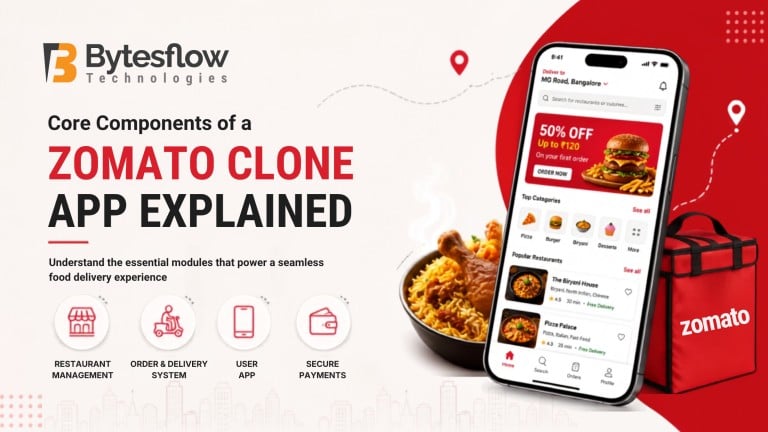
Core Components of a Zomato Clone App Explained
Published: August 31, 2026 | Category: Startup Guide | Read time: ~10 min
Introduction
The food delivery industry has grown from a convenience feature into a full-blown digital economy, and much of that growth rides on well-built apps. If you’re planning to enter this space, understanding the Zomato clone architecture before you build (or buy) one saves you from costly redesigns later. This guide breaks down every core module you need, in plain language, with tables you can actually use for planning.
What Is a Zomato Clone App?
A Zomato clone script is a ready-made, white-label software solution that replicates the core structure of a food delivery platform: ordering, restaurant listings, real-time tracking, and payments, while allowing full branding and customization. Instead of building a food ordering system from zero, you get a tested framework you can shape around your business.
Consequently, most new entrants prefer this route over custom development, since it shortens time-to-market considerably.
Why the Right Components Matter
A functioning Zomato clone isn’t just one app it’s an ecosystem of four connected interfaces working together. Miss one, and the whole system breaks down. For instance, a customer app without live tracking frustrates users, while a delivery app without route optimization slows every order. Therefore, before development begins, map out each component’s role clearly.
According to Business of Apps, the global food delivery app industry is projected to reach $213 billion by 2030 a clear signal that getting the fundamentals right matters more than ever.
Core Components of a Zomato Clone App
Every well-designed on-demand food delivery app clone is built on four interconnected panels. Let’s go through each one.
1. Customer App/Web
This is the face of your platform where users search, order, and pay.
- Restaurant discovery with filters (cuisine, rating, distance)
- Menu browsing with images and pricing
- Cart and multiple payment options
- Live order tracking with map view
- Ratings, reviews, and reorder options
- Push notifications for offers and order updates
2. Restaurant Panel
This module empowers partner restaurants to run their operations smoothly.
- Menu and inventory management
- Real-time order acceptance/rejection
- Sales and performance analytics
- Promotional tools (coupons, banners)
- POS or third-party system integration
For a broader look at building a well-rounded restaurant experience, see how to build a smarter Zomato clone app in 2025.
3. Delivery Agent App
Riders need a lightweight, fast interface built for the road, not the desk.
- Order assignment and acceptance
- Turn-by-turn navigation
- Earnings and payout tracking
- Availability toggle (online/offline)
- In-app chat or call with customer
4. Admin Dashboard
The control center that ties everything together.
- Restaurant and rider onboarding/approval
- Commission and payout management
- Order monitoring and dispute resolution
- Analytics dashboards and reports
- Content and notification management
Component | Primary Users | Core Function |
Customer App/Web | End customers | Browsing, ordering, tracking |
Restaurant Panel | Restaurant owners/staff | Menu and order management |
Delivery Agent App | Delivery riders | Order pickup and delivery |
Admin Dashboard | Platform owner | Oversight, analytics, control |
Supporting Systems Behind a Zomato Clone Script
Beyond the four panels, a reliable food ordering script also depends on backend systems that hold everything together:
Supporting System | Purpose |
Payment Gateway | Secure, multi-option transactions |
Cloud Infrastructure | Scalability during peak order hours |
Push Notification Engine | Real-time alerts across all apps |
Geolocation & Mapping API | Accurate tracking and routing |
Since payment data is sensitive, your platform should also follow guidelines from the PCI Security Standards Council to keep transactions secure and compliant.
Additionally, planning matters as much as features, this step-by-step guide to launching a Zomato clone app in 2026 walks through the full process from research to go-live. And if you’re weighing scope and budget for a similar build, how much an UberEats clone app costs in 2026 is a useful cost comparison to have on hand.
Final Thoughts
Building a successful food delivery platform requires more than a customer-facing ordering app. A complete Zomato clone brings together customer, restaurant, delivery partner, and admin components to create a connected ordering and delivery ecosystem. With the right architecture, integrations, and scalable features, businesses can create a platform tailored to their target market and operational needs.
Ready to launch your own food delivery platform?
Bytesflow Technologies provides customizable digital solutions that help businesses build and launch scalable food delivery platforms. Its flexible architecture, dedicated user and partner applications, and robust management tools can be tailored to meet specific business and operational requirements.
👉 View the Live Demo or Get a Free Consultation Today and start building your Zomato clone!
Frequently Asked Questions
1. What are the core components of a Zomato clone app?
A Zomato clone app has four core components: a customer app/web for ordering, a restaurant panel for managing menus and orders, a delivery agent app for riders, and an admin dashboard for platform oversight. Together, these modules handle discovery, ordering, fulfillment, and management in one connected system.
2. What features should a Zomato clone customer app have?
A customer app should include restaurant search and filters, menu browsing, secure payment options, live order tracking, and push notifications. Reviews and reorder features also improve retention, while a clean UI keeps the ordering process quick and frustration-free for everyday users.
3. What features are essential for the delivery partner app?
Essential features include order assignment, turn-by-turn navigation, an online/offline availability toggle, and real-time earnings tracking. In-app communication with customers is also important, helping riders resolve delivery issues quickly without needing to call a support line.
4. What is the purpose of the admin panel in a Zomato clone?
The admin panel acts as the platform’s control center. It manages restaurant and rider onboarding, tracks commissions and payouts, monitors live orders, resolves disputes, and provides analytics dashboards so platform owners can make informed, data-backed decisions.
5. Why should I consider a Zomato clone script from Bytesflow Technologies?
Bytesflow offers a fully customizable, white-label Zomato clone script with tested modules for customers, restaurants, delivery agents, and admins. This cuts development time significantly, comes with ongoing technical support, and lets you launch a branded food delivery platform faster than building from scratch.